ResourcesBlogs
Shipping Features at Conversation Speed: Multiplayer Development With Agents in the Loop

Shipping Features at Conversation Speed: Multiplayer Development With Agents in the Loop

Synthio Labs Engineering

Product, design, engineering and QA, working from one shared chat thread against one cloud VM.

In most software teams, the expensive part of shipping a feature is not writing the code. It is the feedback loop that surrounds it.

That loop usually runs through several handoffs. Product writes a spec, engineering interprets it, and a pull request gets reviewed and deployed. Only then does the person who asked for the feature see it running, and when it is not what they had in mind, the cycle starts over.
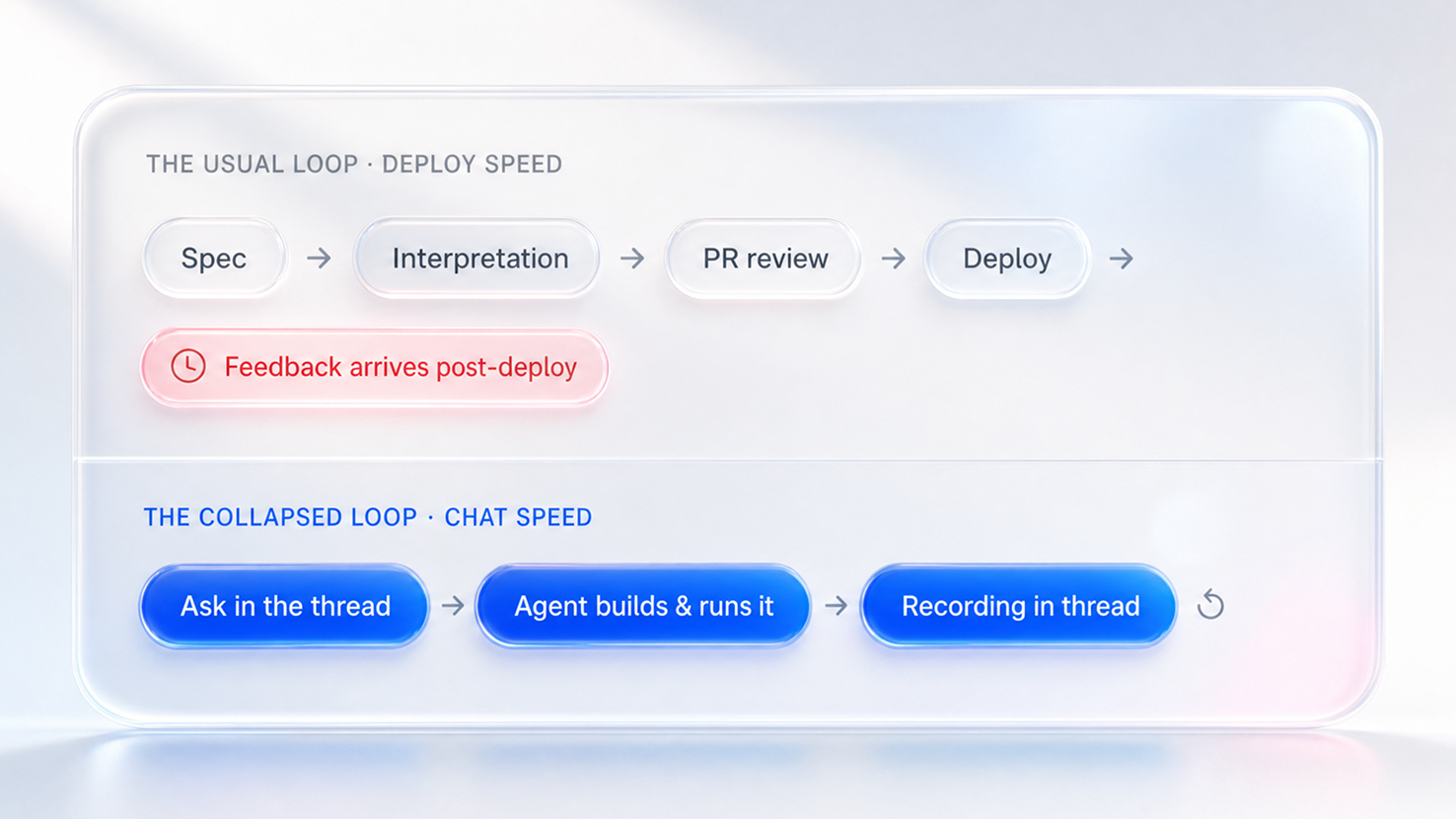
Fig. 1 · When feedback arrives: after deploy in the usual loop, within the thread in the shared-VM loop.

We have been shortening that loop with a simple setup: one disposable computer in the cloud, one agent driving it, and product, design, engineering, and QA all talking to it from the same shared chat thread.

The VM runs our real stack: backend, frontend, and a browser. When someone asks for a change, the agent edits the code, opens the actual application, uses the feature the way a user would, and posts a screen recording of the result back to the thread.

Shared chat thread 4 members
Product
Design
Engineering
QA
prompts →
Agent ← recordings
Disposable cloud VM vm-4f2a
backend:8000
frontend:3000
browserheadless

That recording turns out to be the most useful artifact in the whole process.

A pull request diff is legible mainly to engineers, but a video is legible to everyone. Product can say the layout is not quite right, design can ask for a button to move, and QA can ask what happens when the response comes back empty. The agent makes each change, reruns the application, and posts another recording.

PM
Product 14:02
Not quite, the summary should appear before the chart.
QA
QA 14:03
What happens on an empty response?
Agent APP 14:03
Done. Reordered the layout and added an empty-state message. Here's the rerun:
no results yet
feature-rerun.mp4 0:06 / 0:42 0:17 / 0:42 0:29 / 0:42 0:42 / 0:42

The result is a development loop that runs at the speed of the conversation rather than the speed of a deployment.

Most agent-assisted coding today pairs one engineer with one agent inside one editor. We think the more interesting configuration is a shared one.

A cloud VM belongs to no single person, so nobody’s laptop becomes the bottleneck. Everyone involved in the feature reads the same thread and reacts to the same running application.

By the time an engineer reviews the pull request, the question of whether this is what was wanted has usually been answered in the thread. The review can concentrate on what engineering is best positioned to evaluate: correctness, architecture, security, and maintainability.

One property of the setup matters more than the rest: the shared computer has to remain a real computer.

vm-4f2a  ·  ssh session connected
eng@vm-4f2a:~$  tail -f logs/backend.log
ERROR migration 042 failed: column "status" already exists exit 1
eng@vm-4f2a:~$  make db-reset && make dev
services up  ·  handing back to agent 2.4s
eng@vm-4f2a:~$ 

If the agent gets stuck, an engineer can open the same VM, inspect the terminal and the logs, run commands, fix the problem, and hand control back. The agent automates the common path without hiding the machine underneath it.

Making the VM feel like a real development environment took considerable effort. The local setup an engineer runs on their own machine has to replicate cleanly inside a VM for an agent: the databases and Redis come up the same way they do locally, and the agent even gets its own queues, so its work stays isolated from everyone else’s.

A large part of that work was defining what the agent is allowed to do. Each VM runs under its own IAM role, scoped to the resources the agent needs and nothing more, so giving an agent access never means handing it a person’s credentials.

The same infrastructure extends beyond feature development. It can periodically run critical user journeys and post the recordings to the shared thread, so a regression shows up as a video of the broken experience instead of surfacing as a production incident days later.

And because every run happens inside a disposable VM, the environment starts clean and disappears when the work is done. There is no dependency on anyone’s laptop, less hidden state, and no long-lived local environment accumulating credentials, which matters when the work involves sensitive data.

We think this is what the future of development looks like.

Give the whole team a shared, disposable, observable machine, put an agent on it, and keep the conversation around it.

Much of the alignment work that normally happens after a deploy happens in the thread instead, while the feature is still being built.

Shipping Features at Conversation Speed: Multiplayer Development With Agents in the Loop

Synthio Labs Engineering

Heading

Increase in patient engagement

Heading

Reduction in appointment cancellations

Heading

Improvement in treatment adherence

In most software teams, the expensive part of shipping a feature is not writing the code. It is the feedback loop that surrounds it.

That loop usually runs through several handoffs. Product writes a spec, engineering interprets it, and a pull request gets reviewed and deployed. Only then does the person who asked for the feature see it running, and when it is not what they had in mind, the cycle starts over.

Fig. 1 · When feedback arrives: after deploy in the usual loop, within the thread in the shared-VM loop.

We have been shortening that loop with a simple setup: one disposable computer in the cloud, one agent driving it, and product, design, engineering, and QA all talking to it from the same shared chat thread.

The VM runs our real stack: backend, frontend, and a browser. When someone asks for a change, the agent edits the code, opens the actual application, uses the feature the way a user would, and posts a screen recording of the result back to the thread.

Shared chat thread 4 members
Product
Design
Engineering
QA
prompts →
Agent ← recordings
Disposable cloud VM vm-4f2a
backend:8000
frontend:3000
browserheadless

That recording turns out to be the most useful artifact in the whole process.

A pull request diff is legible mainly to engineers, but a video is legible to everyone. Product can say the layout is not quite right, design can ask for a button to move, and QA can ask what happens when the response comes back empty. The agent makes each change, reruns the application, and posts another recording.

PM
Product 14:02
Not quite, the summary should appear before the chart.
QA
QA 14:03
What happens on an empty response?
Agent APP 14:03
Done. Reordered the layout and added an empty-state message. Here's the rerun:
no results yet
feature-rerun.mp4 0:06 / 0:42 0:17 / 0:42 0:29 / 0:42 0:42 / 0:42

The result is a development loop that runs at the speed of the conversation rather than the speed of a deployment.

Most agent-assisted coding today pairs one engineer with one agent inside one editor. We think the more interesting configuration is a shared one.

A cloud VM belongs to no single person, so nobody’s laptop becomes the bottleneck. Everyone involved in the feature reads the same thread and reacts to the same running application.

By the time an engineer reviews the pull request, the question of whether this is what was wanted has usually been answered in the thread. The review can concentrate on what engineering is best positioned to evaluate: correctness, architecture, security, and maintainability.

One property of the setup matters more than the rest: the shared computer has to remain a real computer.

vm-4f2a  ·  ssh session connected
eng@vm-4f2a:~$  tail -f logs/backend.log
ERROR migration 042 failed: column "status" already exists exit 1
eng@vm-4f2a:~$  make db-reset && make dev
services up  ·  handing back to agent 2.4s
eng@vm-4f2a:~$ 

If the agent gets stuck, an engineer can open the same VM, inspect the terminal and the logs, run commands, fix the problem, and hand control back. The agent automates the common path without hiding the machine underneath it.

Making the VM feel like a real development environment took considerable effort. The local setup an engineer runs on their own machine has to replicate cleanly inside a VM for an agent: the databases and Redis come up the same way they do locally, and the agent even gets its own queues, so its work stays isolated from everyone else’s.

A large part of that work was defining what the agent is allowed to do. Each VM runs under its own IAM role, scoped to the resources the agent needs and nothing more, so giving an agent access never means handing it a person’s credentials.

The same infrastructure extends beyond feature development. It can periodically run critical user journeys and post the recordings to the shared thread, so a regression shows up as a video of the broken experience instead of surfacing as a production incident days later.

And because every run happens inside a disposable VM, the environment starts clean and disappears when the work is done. There is no dependency on anyone’s laptop, less hidden state, and no long-lived local environment accumulating credentials, which matters when the work involves sensitive data.

We think this is what the future of development looks like.

Give the whole team a shared, disposable, observable machine, put an agent on it, and keep the conversation around it.

Much of the alignment work that normally happens after a deploy happens in the thread instead, while the feature is still being built.

Download icon with a downward arrow pointing to a horizontal line inside a blue circular button.

Thank you! The case study will be emailed to you shortly. Please check your spam and junk folders

Oops! Something went wrong while submitting the form.
Download icon with a downward arrow pointing to a horizontal line inside a blue circular button.

Thank you! The case study will be emailed to you shortly. Please check your spam and junk folders

Oops! Something went wrong while submitting the form.